How to Organize a Refrigerator for Plate-Sale Prep
Build a safer cold-storage system with verified temperatures, raw-to-ready separation, useful labels, shelf zones, and a realistic order-cap test.
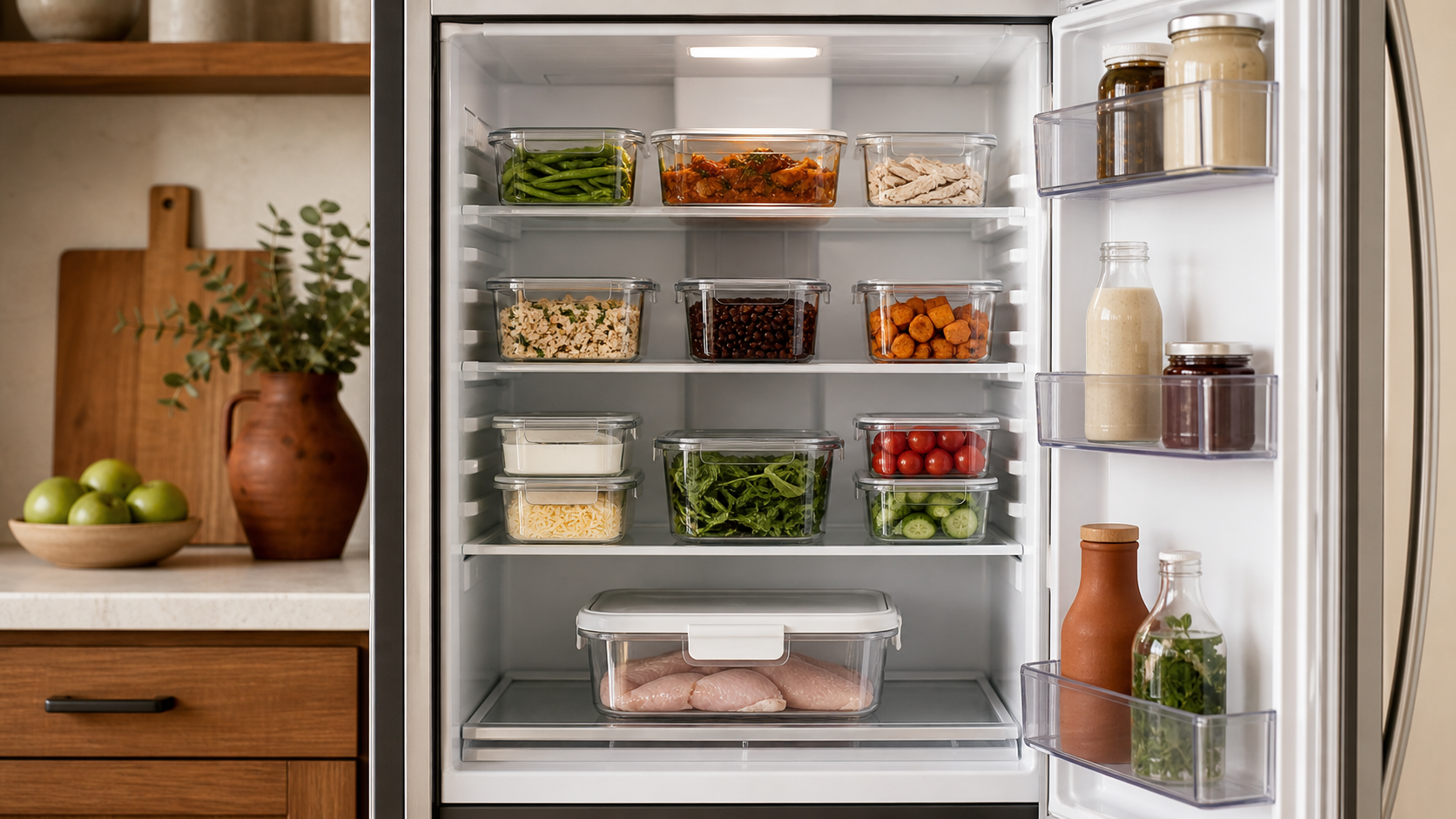
A refrigerator can look organized and still fail your plate-sale plan. Raw chicken may be sitting over ready-to-eat slaw, a sauce may have no preparation date, or a full shelf may block the cold air that kept an emptier refrigerator in range.
This guide will help you turn refrigerator space into an operating system. You will set a verified temperature target, map zones from ready-to-eat food down to contained raw food, label each container, rotate stock, and test whether the unit can support your promised order count.
Cold-storage rules depend on the food, equipment, facility, and jurisdiction. The FDA Food Code is a model used by food regulators, not a universal home-food-business rule. Before storing food for sale, verify current local requirements with the authority responsible for your operation, including whether your refrigerator and proposed foods are allowed.
Set the target before arranging a shelf
Start with the cold-holding limit required by your regulator. In the current FDA model, time/temperature control for safety food is generally held at 41°F or less, with specific exceptions. The CDC recommends 40°F or below for a home refrigerator, as does USDA consumer guidance.
Those numbers serve different contexts. Follow the rule for your business, then choose a conservative operating target that leaves room for recovery after loading and door openings. Record both so a helper knows which number triggers action.
Use an appliance thermometer even when the refrigerator has a display. The display may show a setting or a sensor reading from one location, not the temperature beside every container. University of Minnesota Extension advises checking the warmest area and not overloading the unit. Follow the refrigerator manufacturer’s instructions when choosing thermometer locations and adjusting the unit.
Make a shelf map from low risk to high risk
Reserve the upper protected zone for cooked and ready-to-eat food. These items will receive no later cooking step to correct contamination from a leaking raw package. Put washed produce, prepared sides, sauces, and fully cooled cooked components in clean, covered containers in their assigned zones.
Keep raw meat, poultry, seafood, and eggs separated from ready-to-eat food. The FDA model requires raw animal food to be separated during storage, while the CDC advises sealed containers or secure wrapping so raw juices cannot leak onto other foods. Give raw food the lowest usable zone inside a leakproof secondary bin.
Do not treat “bottom shelf” as the whole control. The package still needs to be intact and contained. Separate different raw animal foods from one another as your adopted rule and preparation process require; a tray that leaks into another raw ingredient can create a different cooking-control problem.
A simple map might read:
| Zone | Assigned contents | Main control |
|---|---|---|
| Upper shelf | Covered cooked and ready-to-eat components | Protected from raw food and unnecessary handling |
| Middle shelf | Sealed dairy, washed produce, sauces, and ingredients awaiting assembly | Identified, dated, and grouped by menu |
| Lowest shelf | Contained raw animal food | Leakproof secondary bin below ready-to-eat food |
| Door | Low-risk items permitted by their storage instructions | No critical item placed there for convenience alone |
Adapt the map to the actual refrigerator design. If a drawer cannot be cleaned, a shelf cannot support the load, or air vents are blocked, that position is not usable capacity.
Close, identify, and date every container
The FDA model generally calls for food to be stored in packages, covered containers, or wrappings. It also requires working containers of ingredients removed from their original packages to carry the common food name unless the contents are unmistakable.
Build one label pattern that answers the decisions your process requires:
- Common food name and recipe version
- Preparation, opening, or receiving date and time when relevant
- Use, sale, or discard date required by the applicable procedure
- Batch or order reference
- Allergen or restricted-use control when part of your approved system
- Initials of the person who stored it
Date marking is not the same as guessing a shelf life. In the FDA model, certain refrigerated ready-to-eat TCS foods held longer than 24 hours are date marked and generally limited to seven days at 41°F or less, with Day 1 as the preparation day and stated exceptions. That is not permission to keep every food for seven days. A manufacturer date, product-specific limit, local rule, or your verified procedure may require an earlier decision.
The federal cold-storage chart also shows that conservative home-refrigeration limits vary by food. Use it as consumer guidance, not as a substitute for the rule and process governing a food business.
Give every sale a refrigerator capacity limit
Shelf volume is not the same as usable cold-storage capacity. Containers need clearance, air needs a path, raw food needs separation, and a door must close without forcing. The refrigerator also has to recover after ingredients are loaded and retrieved.
Before accepting orders, list every refrigerated item required at the busiest point of the sale:
- Prepared cold components
- Raw food waiting for its batch
- Finished food held under an approved cold process
- Sauces, garnishes, and customer add-ons
- Household food that will remain in the shared unit
Suppose an 18-order menu needs two raw-chicken bins, three ready-to-eat side containers, two sauce containers, and space for household food. Place the actual empty containers in their assigned zones, leave the required air paths, and confirm the door closes normally. Then run the representative load with chilled test contents or an equivalent safe load and monitor it through normal door openings.
If the unit cannot maintain the operating target, reduce the order cap, change the menu, add approved capacity, or separate production days. Do not solve a capacity failure by stacking raw food over finished sides or packing containers tightly against an air vent. Connect the verified number to your preorder system so the sales cap reflects the cold space you actually have.
Separate storage from active cooling
A refrigerator that holds already-cold food safely may not have enough capacity to cool a large hot batch. Hot containers add heat to the unit, require space around them, and can affect nearby food. Ordinary shelf organization does not prove that a cooked product will pass its required cooling checkpoints.
Use the separate cooked-food cooling workflow when advance preparation is permitted. That process covers shallow containers, smaller portions, measured time-and-temperature stages, corrective decisions, and a cooling-capacity test. Only move a completed batch into its mapped storage zone after the required cooling process and labeling steps are complete.
Likewise, do not thaw food on the counter to free refrigerator space. CDC guidance recommends thawing in the refrigerator, in cold water using the appropriate method, or in the microwave, rather than at room temperature. Put planned refrigerator thawing on the shelf map so raw-food containment remains intact throughout the process.
Check the loaded refrigerator, not just the empty one
Test the refrigerator under a representative sale-day pattern before relying on it. Start with a clean unit, confirm the thermometer you use is accurate under its instructions, place sensors in the chosen monitoring locations, and load the mapped containers without blocking vents.
Record readings at meaningful moments:
| Checkpoint | What to record | Decision |
|---|---|---|
| Before loading | Unit and food temperatures | Release the refrigerator or correct the problem |
| After the representative load | Temperature and container arrangement | Confirm zones and airflow still work |
| After a realistic door-opening period | Highest observed reading and recovery | Keep, revise, or reduce the planned load |
| Before production | Current temperature, leaks, labels, and space | Release ingredients to the schedule |
| End of service | Remaining food and final disposition | Store under an approved procedure or discard |
The reading needs a named device and action, not just a number. The guide to calibrating a food thermometer explains how to check a food probe; use the manufacturer-approved process for an appliance thermometer. If the unit is out of limit, food has leaked, or a label is missing, stop and follow your corrective procedure rather than rearranging the evidence and carrying on.
Build shelf work into the production schedule
Plan refrigerator visits the same way you plan cooking and packing. Group ingredient pulls by task, return food promptly under the approved procedure, and avoid leaving the door open while deciding what comes next. A shelf map helps because the cook knows where each component lives before the clock gets tight.
Add these moments to your plate-sale production schedule:
- Opening temperature and condition check
- Ingredient pull for each batch
- Raw-bin inspection after handling
- Placement of cooled and labeled components
- Pre-packing check of ready-to-eat items
- Final inventory and discard decision
Assign one person to verify the refrigerator at each checkpoint. Shared responsibility often means nobody notices that a raw package moved, a container lost its label, or an unplanned order displaced the air gap.
Run a seven-point refrigerator check
Before the next sale, confirm:
- Approval: The facility, refrigerator, foods, and storage processes are allowed for your operation.
- Temperature: The legal limit and conservative operating target are written and verified with the right device.
- Zones: Ready-to-eat food is protected above contained raw animal food.
- Containers: Every package is intact, closed, food-safe, and placed where leaks cannot spread.
- Labels: Identity, dates, batch information, and required controls lead to a clear use-or-discard decision.
- Capacity: A representative load leaves airflow and stays in range through realistic door openings.
- Actions: An out-of-range reading, leak, damaged package, or missing label triggers a documented correction.
Start by emptying one shelf at a time, cleaning it under your approved procedure, and assigning its job. Then stage the containers for your busiest planned service and test the loaded unit before that order count goes live. The Selling Plates guide can help connect the refrigerator map to the broader menu, pricing, ordering, and sale-day system so cold storage becomes a real capacity decision instead of a last-minute puzzle.
Ready to move?
Turn the research phase into your first sale.
The guide brings pricing, menu planning, marketing, and setup into one clear playbook.
Get the guide on Gumroad